
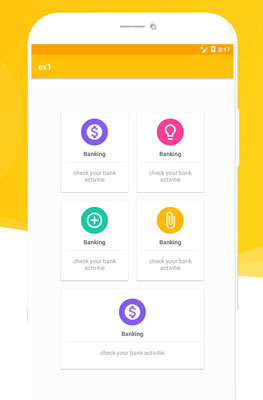
نقدم في هذا المثال طريقة إضافة واجهة البداية (Dashboard) لتصميمك بحيت وضعت ايقونات كبيرة وفي شكل منظم يسهل على المستخدم ولوج باقي معطيات الطبيق.
- الخطوة 1: إضافة هذه الألوان إلى colors.xml
<?xml version="1.0" encoding="utf-8"?>
<resources>
    <color name="colorPrimary">#FFC107</color>
    <color name="colorPrimaryDark">#FFA000</color>
    <color name="backgroundcolor">#fcfcfc</color>
    <color name="lightgray">#ededed</color>
    <color name="deeppurple">#7c4dff</color>
    <color name="yello">#ffb300</color>
    <color name="green">#00bfa5</color>
    <color name="colorAccent">#FF4081</color>
    <color name="darkblue">#23283a</color>
    <color name="testcolorblue">#152b38</color>
    <color name="pink">#fe104d</color>

    <color name="black_overlay">#66000000</color>
</resources>
- الخطوة 2: إضافة مكتبة cardview إلى build.raddle
dependencies {
// don t forget to change 25.3.1 to your api lvl mine is 25.3.1
    compile 'com.android.support:cardview-v7:25.3.1'
}
- الخطوة 3: إنشاء خلفيات دائرية
<?xml version="1.0" encoding="utf-8"?>
<shape android:shape="oval" xmlns:android="http://schemas.android.com/apk/res/android">
    <solid android:color="@color/colorAccent"/>
</shape>
cerclebackgroundgreen.xml
<?xml version="1.0" encoding="utf-8"?>
<shape android:shape="oval" xmlns:android="http://schemas.android.com/apk/res/android">
    <solid android:color="@color/green"/>
</shape>
cerclebackgroundpurple.xml
<?xml version="1.0" encoding="utf-8"?>
<shape android:shape="oval" xmlns:android="http://schemas.android.com/apk/res/android">
<solid android:color="@color/deeppurple"/>
</shape>
cerclebackgroundyello.xml
<?xml version="1.0" encoding="utf-8"?>
<shape android:shape="oval" xmlns:android="http://schemas.android.com/apk/res/android">
    <solid android:color="@color/yello"/>
</shape>
- الخطوة 4: إنشاء الشكل
<?xml version="1.0" encoding="utf-8"?>
<shape xmlns:android="http://schemas.android.com/apk/res/android">
<solid android:color="#dfdfdf" />
    <padding android:bottom="15dp" android:left="15dp" android:right="15dp" android:top="15dp"/>
    <corners android:radius="25dp"/>
</shape>
cardbackground.xml
<?xml version="1.0" encoding="utf-8"?>
<shape xmlns:android="http://schemas.android.com/apk/res/android">
<solid android:color="#fff" />
    <stroke android:color="#2d2d2d" android:width="1dp"/>
</shape>
- الخطوة 5: إنشاء ملف activity_home.xml
<?xml version="1.0" encoding="utf-8"?>
<LinearLayout
    xmlns:android="http://schemas.android.com/apk/res/android"
    xmlns:app="http://schemas.android.com/apk/res-auto"
    xmlns:tools="http://schemas.android.com/tools"
    android:layout_width="match_parent"
    android:layout_height="match_parent"
    tools:context="com.demotxt.droidsrce.homedashboard.Home"
    android:orientation="vertical"
    android:padding="10dp"
    android:background="#fcfcfc"
    android:gravity="center"
    android:id="@+id/ll">
    <LinearLayout
        android:clipToPadding="false"
        android:gravity="center"
        android:orientation="horizontal"
        android:layout_width="match_parent"
        android:layout_height="wrap_content">
        <android.support.v7.widget.CardView
            android:foreground="?android:attr/selectableItemBackground"
            android:clickable="true"
            android:id="@+id/bankcardId"
            android:layout_width="160dp"
            android:layout_height="190dp"
            android:layout_margin="10dp">
        <LinearLayout
            android:layout_width="match_parent"
            android:layout_height="match_parent"
            android:orientation="vertical"
            android:gravity="center">
            <ImageView
                android:layout_width="64dp"
                android:layout_height="64dp"
                android:background="@drawable/cerclebackgroundpurple"
                android:src="@drawable/ic_attach_money_black_24dp"
                android:padding="10dp"/>
            <TextView
                android:layout_width="wrap_content"
                android:layout_height="wrap_content"
                android:textStyle="bold"
                android:layout_marginTop="10dp"
                android:text="Banking"/>
            <View
                android:layout_width="match_parent"
                android:layout_height="1dp"
                android:background="@color/lightgray"
                android:layout_margin="10dp"/>
            <TextView
                android:layout_width="wrap_content"
                android:layout_height="wrap_content"
                android:gravity="center"
                android:text="Check your bank activities"
                android:padding="5dp"
                android:textColor="@android:color/darker_gray"/>

        </LinearLayout>
        </android.support.v7.widget.CardView>
        <android.support.v7.widget.CardView
            android:foreground="?android:attr/selectableItemBackground"
            android:clickable="true"
            android:layout_width="160dp"
            android:layout_height="190dp"
            android:layout_margin="10dp">
            <LinearLayout
                android:layout_width="match_parent"
                android:layout_height="match_parent"
                android:orientation="vertical"
                android:gravity="center">
                <ImageView
                    android:layout_width="64dp"
                    android:layout_height="64dp"
                    android:background="@drawable/cerclebackgroundpink"
                    android:src="@drawable/ic_lightbulb_outline_black_24dp"
                    android:padding="10dp"/>
                <TextView
                    android:layout_width="wrap_content"
                    android:layout_height="wrap_content"
                    android:textStyle="bold"
                    android:layout_marginTop="10dp"
                    android:text="Ideas"/>
                <View
                    android:layout_width="match_parent"
                    android:layout_height="1dp"
                    android:background="@color/lightgray"
                    android:layout_margin="10dp"/>
                <TextView
                    android:layout_width="wrap_content"
                    android:layout_height="wrap_content"
                    android:gravity="center"
                    android:text="Check your bank activities"
                    android:padding="5dp"
                    android:textColor="@android:color/darker_gray"/>

            </LinearLayout>
        </android.support.v7.widget.CardView>

    </LinearLayout>
    <LinearLayout
    android:clipToPadding="false"
    android:gravity="center"
    android:orientation="horizontal"
    android:layout_width="match_parent"
    android:layout_height="wrap_content">
    <android.support.v7.widget.CardView
        android:foreground="?android:attr/selectableItemBackground"
        android:clickable="true"
        android:layout_width="160dp"
        android:layout_height="190dp"
        android:layout_margin="10dp">
        <LinearLayout
            android:layout_width="match_parent"
            android:layout_height="match_parent"
            android:orientation="vertical"
            android:gravity="center">
            <ImageView
                android:layout_width="64dp"
                android:layout_height="64dp"
                android:background="@drawable/cerclebackgroundgreen"
                android:src="@drawable/ic_control_point_black_24dp"
                android:padding="10dp"/>
            <TextView
                android:layout_width="wrap_content"
                android:layout_height="wrap_content"
                android:textStyle="bold"
                android:layout_marginTop="10dp"
                android:text="Add"/>
            <View
                android:layout_width="match_parent"
                android:layout_height="1dp"
                android:background="@color/lightgray"
                android:layout_margin="10dp"/>
            <TextView
                android:layout_width="wrap_content"
                android:layout_height="wrap_content"
                android:gravity="center"
                android:text="Check your bank activities"
                android:padding="5dp"
                android:textColor="@android:color/darker_gray"/>

        </LinearLayout>
    </android.support.v7.widget.CardView>
    <android.support.v7.widget.CardView
        android:foreground="?android:attr/selectableItemBackground"
        android:clickable="true"
        android:layout_width="160dp"
        android:layout_height="190dp"
        android:layout_margin="10dp">

        <LinearLayout
            android:layout_width="match_parent"
            android:layout_height="match_parent"
            android:gravity="center"
            android:orientation="vertical">

            <ImageView
                android:layout_width="64dp"
                android:layout_height="64dp"
                android:background="@drawable/cerclebackgroundyello"
                android:padding="10dp"
                android:src="@drawable/ic_attach_file_black_24dp" />

            <TextView
                android:layout_width="wrap_content"
                android:layout_height="wrap_content"
                android:layout_marginTop="10dp"
                android:text="Links"
                android:textStyle="bold" />

            <View
                android:layout_width="match_parent"
                android:layout_height="1dp"
                android:layout_margin="10dp"
                android:background="@color/lightgray" />

            <TextView
                android:layout_width="wrap_content"
                android:layout_height="wrap_content"
                android:gravity="center"
                android:padding="5dp"
                android:text="Check your bank activities"
                android:textColor="@android:color/darker_gray" />

        </LinearLayout>
    </android.support.v7.widget.CardView>

</LinearLayout>
    <LinearLayout
        android:clipToPadding="false"
        android:gravity="center"
        android:orientation="horizontal"
        android:layout_width="match_parent"
        android:layout_height="wrap_content">
        <android.support.v7.widget.CardView
            android:foreground="?android:attr/selectableItemBackground"
            android:clickable="true"
            android:layout_width="340dp"
            android:layout_height="150dp"
            android:layout_margin="10dp">
            <LinearLayout

                android:layout_width="match_parent"
                android:layout_height="match_parent"
                android:orientation="vertical"
                android:gravity="center">
                <ImageView
                    android:layout_width="64dp"
                    android:layout_height="64dp"
                    android:background="@drawable/cerclebackgroundpurple"
                    android:src="@drawable/ic_wifi_black_24dp"
                    android:padding="10dp"/>
                <TextView
                    android:layout_width="wrap_content"
                    android:layout_height="wrap_content"
                    android:textStyle="bold"
                    android:layout_marginTop="10dp"
                    android:text="Add"/>
                <View
                    android:layout_width="match_parent"
                    android:layout_height="1dp"
                    android:background="@color/lightgray"
                    android:layout_margin="10dp"/>
                <TextView
                    android:layout_width="wrap_content"
                    android:layout_height="wrap_content"
                    android:gravity="center"
                    android:text="Check your bank activities"
                    android:padding="5dp"
                    android:textColor="@android:color/darker_gray"/>

            </LinearLayout>
        </android.support.v7.widget.CardView>


    </LinearLayout>
</LinearLayout>