
الخطوة 1 – إنشاء مشروع جديد وتسمية مشروعك باسم (WriteToFile).
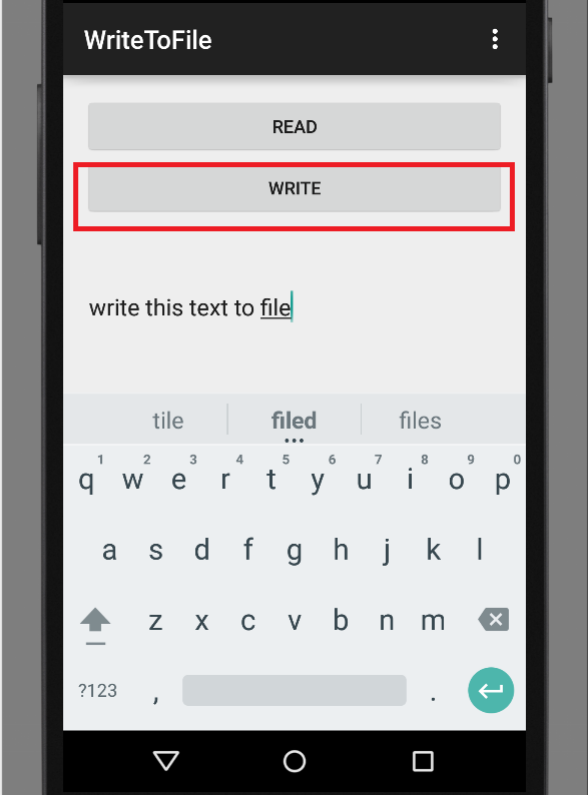
الخطوة 2 – إضافة زرين ، و (EditText) و (TextView) في النشاط الرئيسي (activity_main.xml).
<RelativeLayout xmlns:android="http://schemas.android.com/apk/res/android"
    xmlns:tools="http://schemas.android.com/tools" android:layout_width="match_parent"
    android:layout_height="match_parent" android:paddingLeft="@dimen/activity_horizontal_margin"
    android:paddingRight="@dimen/activity_horizontal_margin"
    android:paddingTop="@dimen/activity_vertical_margin"
    android:paddingBottom="@dimen/activity_vertical_margin" tools:context=".MainActivity">

    <Button
        android:layout_width="match_parent"
        android:layout_height="wrap_content"
        android:text="Read"
        android:id="@+id/button2"
        android:layout_alignParentRight="true"
        android:layout_alignParentEnd="true"
        android:onClick="read"/>

    <Button
        android:layout_width="fill_parent"
        android:layout_height="wrap_content"
        android:text="Write"
        android:id="@+id/button"
        android:layout_below="@+id/button2"
        android:layout_alignParentLeft="true"
        android:layout_alignParentStart="true"
        android:onClick="write" />

    <EditText
        android:layout_width="fill_parent"
        android:layout_height="wrap_content"
        android:id="@+id/editText"
        android:layout_below="@+id/button"
        android:layout_alignParentLeft="true"
        android:layout_alignParentStart="true"
        android:lines="6" />

    <TextView
        android:layout_width="fill_parent"
        android:layout_height="wrap_content"
        android:textAppearance="?android:attr/textAppearanceLarge"
        android:text="Large Text"
        android:id="@+id/textView"
        android:lines="6"
        android:layout_below="@+id/editText"
        android:layout_alignParentLeft="true"
        android:layout_alignParentStart="true" />
</RelativeLayout>
ادخل الكود التالي في ملف (MainActivity.java)
package com.example.programmingknowledge.writetofile;

import android.support.v7.app.ActionBarActivity;
import android.os.Bundle;
import android.view.Menu;
import android.view.MenuItem;
import android.view.View;
import android.widget.EditText;
import android.widget.TextView;
import android.widget.Toast;

import java.io.BufferedReader;
import java.io.FileInputStream;
import java.io.FileNotFoundException;
import java.io.FileOutputStream;
import java.io.IOException;
import java.io.InputStreamReader;


public class MainActivity extends ActionBarActivity {
    EditText editText;
    TextView textView;

    @Override
    protected void onCreate(Bundle savedInstanceState) {
        super.onCreate(savedInstanceState);
        setContentView(R.layout.activity_main);
        editText = (EditText)findViewById(R.id.editText);
        textView=(TextView)findViewById(R.id.textView);
    }

    public void read(View view) {
        try {
            FileInputStream fileInputStream= openFileInput("myText.txt");
            InputStreamReader inputStreamReader = new InputStreamReader(fileInputStream);
            BufferedReader bufferedReader = new BufferedReader(inputStreamReader);
            StringBuffer stringBuffer = new StringBuffer();
            String lines;
            while ((lines=bufferedReader.readLine())!=null) {
                stringBuffer.append(lines+"\n");
            }
            textView.setText(stringBuffer.toString());
        } catch (FileNotFoundException e) {
            e.printStackTrace();
        } catch (IOException e) {
            e.printStackTrace();
        }
    }

    public void write(View view) {
        String Mytextmessage  = editText.getText().toString();
        try {
            FileOutputStream fileOutputStream = openFileOutput("myText.txt",MODE_PRIVATE);
            fileOutputStream.write(Mytextmessage.getBytes());
            fileOutputStream.close();
            Toast.makeText(getApplicationContext(),"Text Saved",Toast.LENGTH_LONG).show();
            editText.setText("");
        } catch (FileNotFoundException e) {
            e.printStackTrace();
        } catch (IOException e) {
            e.printStackTrace();
        }
    }

    @Override
    public boolean onCreateOptionsMenu(Menu menu) {
        // Inflate the menu; this adds items to the action bar if it is present.
        getMenuInflater().inflate(R.menu.menu_main, menu);
        return true;
    }

    @Override
    public boolean onOptionsItemSelected(MenuItem item) {
        // Handle action bar item clicks here. The action bar will
        // automatically handle clicks on the Home/Up button, so long
        // as you specify a parent activity in AndroidManifest.xml.
        int id = item.getItemId();

        //noinspection SimplifiableIfStatement
        if (id == R.id.action_settings) {
            return true;
        }

        return super.onOptionsItemSelected(item);
    }
}
+ تستخدم فئة (FileInputStream) في التعليمات البرمجية لقراءة البيانات من ملف.
+ تستخدم فئة (FileOutputStream) في التعليمات البرمجية لكتابة البيانات في الملف.
في حالة وجود الملف، يمكن استبداله أو إلحاقه، و إذا لم يكن موجودًا ، فسيتم إنشاء ملف جديد.
الآن قم بتشغيل التطبيق.