
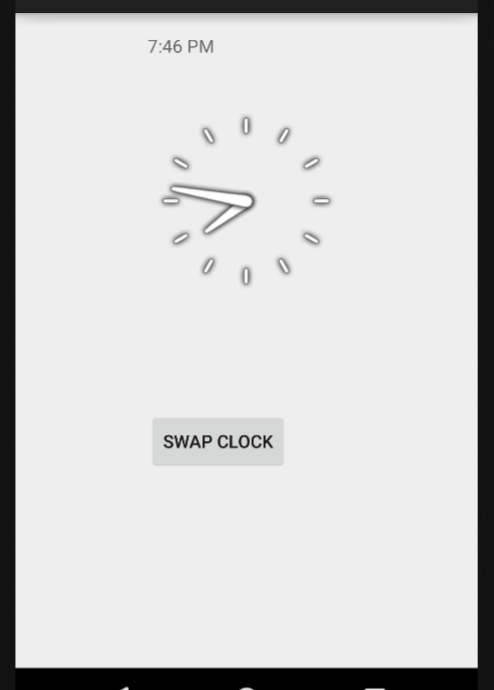
في هذه المقالة سنقدم لك الكود الكامل لإضافة ساعة العقارب وكذلك ساعة الأرقام.
قد تحتاج في بعض التطبيقات الى إدراج ساعة، اما من أجل التأشير للوقت أو للحساب الزمني…والاستعمالات كثيرة. سوف ندرج بعض الأمثلة في القريب انشاء الله.
كما اعتدنا، سنفتح تطبيق الاندرويد ستوديو ثم نقوم بانشاء مشروع جديد.
- الخطوة الاولى: اضف الكود التالي في ملف AndroidManifest.xml
<RelativeLayout xmlns:android="http://schemas.android.com/apk/res/android"
    xmlns:tools="http://schemas.android.com/tools" android:layout_width="match_parent"
    android:layout_height="match_parent" android:paddingLeft="@dimen/activity_horizontal_margin"
    android:paddingRight="@dimen/activity_horizontal_margin"
    android:paddingTop="@dimen/activity_vertical_margin"
    android:paddingBottom="@dimen/activity_vertical_margin" tools:context=".MainActivity">

    <AnalogClock
        android:layout_width="wrap_content"
        android:layout_height="wrap_content"
        android:id="@+id/analogClock"
        android:layout_below="@+id/digitalClock"
        android:layout_centerHorizontal="true"
        android:layout_marginTop="35dp" />

    <DigitalClock
        android:layout_width="wrap_content"
        android:layout_height="wrap_content"
        android:id="@+id/digitalClock"
        android:layout_toEndOf="@+id/button"
        android:layout_alignParentTop="true"
        android:layout_alignLeft="@+id/analogClock"
        android:layout_alignStart="@+id/analogClock" />

    <Button
        android:layout_width="wrap_content"
        android:layout_height="wrap_content"
        android:text="Swap Clock"
        android:id="@+id/button"
        android:layout_below="@+id/analogClock"
        android:layout_alignLeft="@+id/analogClock"
        android:layout_alignStart="@+id/analogClock"
        android:layout_marginTop="86dp" />

</RelativeLayout>
- الخطوة التانية: اضف الكود التالي في ملف activity_main.xml
package com.example.programmingknowledge.programmingknowledgeapp;

import android.support.v7.app.ActionBarActivity;
import android.os.Bundle;
import android.view.Menu;
import android.view.MenuItem;
import android.view.View;
import android.widget.AnalogClock;
import android.widget.Button;
import android.widget.DigitalClock;
import android.widget.TimePicker;
import android.widget.Toast;


public class MainActivity extends ActionBarActivity {
     private static Button buttonSbm;
     private static DigitalClock digital;
    private static AnalogClock analog;
    TimePicker tp;
    Button btn;
    @Override
    protected void onCreate(Bundle savedInstanceState) {
        super.onCreate(savedInstanceState);
        setContentView(R.layout.activity_main);
        OnButtonClickListener();
    }

    public  void OnButtonClickListener() {
        buttonSbm = (Button)findViewById(R.id.button);
        digital = (DigitalClock)findViewById(R.id.digitalClock);
        analog = (AnalogClock)findViewById(R.id.analogClock);

        buttonSbm.setOnClickListener(
                new View.OnClickListener() {
                    @Override
                    public void onClick(View v) {
                        if(digital.getVisibility() == DigitalClock.GONE) {
                            digital.setVisibility(DigitalClock.VISIBLE);
                            analog.setVisibility(AnalogClock.GONE);
                        } else {
                            digital.setVisibility(DigitalClock.GONE);
                            analog.setVisibility(AnalogClock.VISIBLE);
                        }
                    }
                }
        );

    }


    @Override
    public boolean onCreateOptionsMenu(Menu menu) {
        // Inflate the menu; this adds items to the action bar if it is present.
        getMenuInflater().inflate(R.menu.menu_main, menu);
        return true;
    }

    @Override
    public boolean onOptionsItemSelected(MenuItem item) {
        // Handle action bar item clicks here. The action bar will
        // automatically handle clicks on the Home/Up button, so long
        // as you specify a parent activity in AndroidManifest.xml.
        int id = item.getItemId();

        //noinspection SimplifiableIfStatement
        if (id == R.id.action_settings) {
            return true;
        }

        return super.onOptionsItemSelected(item);
    }
}
الان قم بتجربة التطبيق.