
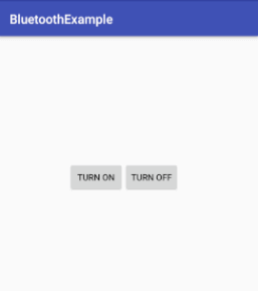
في ما يلي كود بسيط من أجل استعمال بلوتوث الجهاز، بوضع زرين لإيقافه و تشغيله بالاعتماد على نظام (Android Bluetooth).
كما اعتدنا نقوم بإنشاء مشروع جديد.
- الخطوة الأولى: وضع الكود التالي مكان الموجود داخل ملف (activity_main.xml)
<?xml version="1.0" encoding="utf-8"?>
<RelativeLayout xmlns:android="http://schemas.android.com/apk/res/android"
    android:layout_width="match_parent"
    android:layout_height="match_parent"
    android:paddingLeft="10dp"
    android:paddingRight="10dp">
    <Button
        android:id="@+id/btnOn"
        android:layout_width="wrap_content"
        android:layout_height="wrap_content"
        android:text="Turn On" android:layout_marginLeft="100dp" android:layout_marginTop="200dp" />
    <Button
        android:id="@+id/btnOFF"
        android:layout_width="wrap_content"
        android:layout_height="wrap_content"
        android:layout_alignBottom="@+id/btnOn"
        android:layout_toRightOf="@+id/btnOn"
        android:text="Turn OFF" />
</RelativeLayout>
- الخطوة الثانية: وضع الكود التالي مكان الموجود داخل ملف (MainActivity.java)
package com.yourname.bluetoothexample;
import android.bluetooth.BluetoothAdapter;
import android.content.Intent;
import android.support.v7.app.AppCompatActivity;
import android.os.Bundle;
import android.view.View;
import android.widget.Button;
import android.widget.Toast;

public class MainActivity extends AppCompatActivity {
    @Override
    protected void onCreate(Bundle savedInstanceState) {
        super.onCreate(savedInstanceState);
        setContentView(R.layout.activity_main);
        Button btntOn = (Button)findViewById(R.id.btnOn);
        Button btntOff = (Button)findViewById(R.id.btnOFF);
        final BluetoothAdapter bAdapter = BluetoothAdapter.getDefaultAdapter();
        btntOn.setOnClickListener(new View.OnClickListener() {
            @Override
            public void onClick(View v) {
            if(bAdapter == null)
            {
                Toast.makeText(getApplicationContext(),"Bluetooth Not Supported",Toast.LENGTH_SHORT).show();
            }
            else{
                if(!bAdapter.isEnabled()){
                    startActivityForResult(new Intent(BluetoothAdapter.ACTION_REQUEST_ENABLE),1);
                    Toast.makeText(getApplicationContext(),"Bluetooth Turned ON",Toast.LENGTH_SHORT).show();
                }
            }
            }
        });
        btntOff.setOnClickListener(new View.OnClickListener() {
            @Override
            public void onClick(View v) {
                bAdapter.disable();
                Toast.makeText(getApplicationContext(),"Bluetooth Turned OFF", Toast.LENGTH_SHORT).show();
            }
        });
    }
}
- الخطوة التالثة: وضع الكود التالي مكان الموجود داخل ملف (AndroidManifest.xml)
<?xml version="1.0" encoding="utf-8"?>
<manifest xmlns:android="http://schemas.android.com/apk/res/android"
    package="com.yourname.bluetoothexample">
    <uses-permission android:name="android.permission.BLUETOOTH"/>
    <uses-permission android:name="android.permission.BLUETOOTH_ADMIN"/>
    <application
        android:allowBackup="true"
        android:icon="@mipmap/ic_launcher"
        android:label="@string/app_name"
        android:roundIcon="@mipmap/ic_launcher_round"
        android:supportsRtl="true"
        android:theme="@style/AppTheme">
        <activity android:name=".MainActivity">
            <intent-filter>
                <action android:name="android.intent.action.MAIN" />
                <category android:name="android.intent.category.LAUNCHER" />
            </intent-filter>
        </activity>
    </application>
</manifest>
الآن قم بتجربة التطبيق. ستجد إنشاء الله تطبيق كامل لجميع استخدامات البلوتوث مفتوح المصدر في خانة تطبيقات مفتوحة المصدر.
بالتوفيق